This is the abridged developer documentation for anki-llm
# What is anki-llm?
> Bulk-process, generate, and maintain Anki flashcards with LLMs and text-to-speech.
`anki-llm` is a CLI and terminal UI for repeatable, reviewable AI workflows over an Anki collection. It connects Anki Desktop to OpenAI-compatible language models to transform existing notes, generate candidate cards, add audio, and maintain card templates as files. 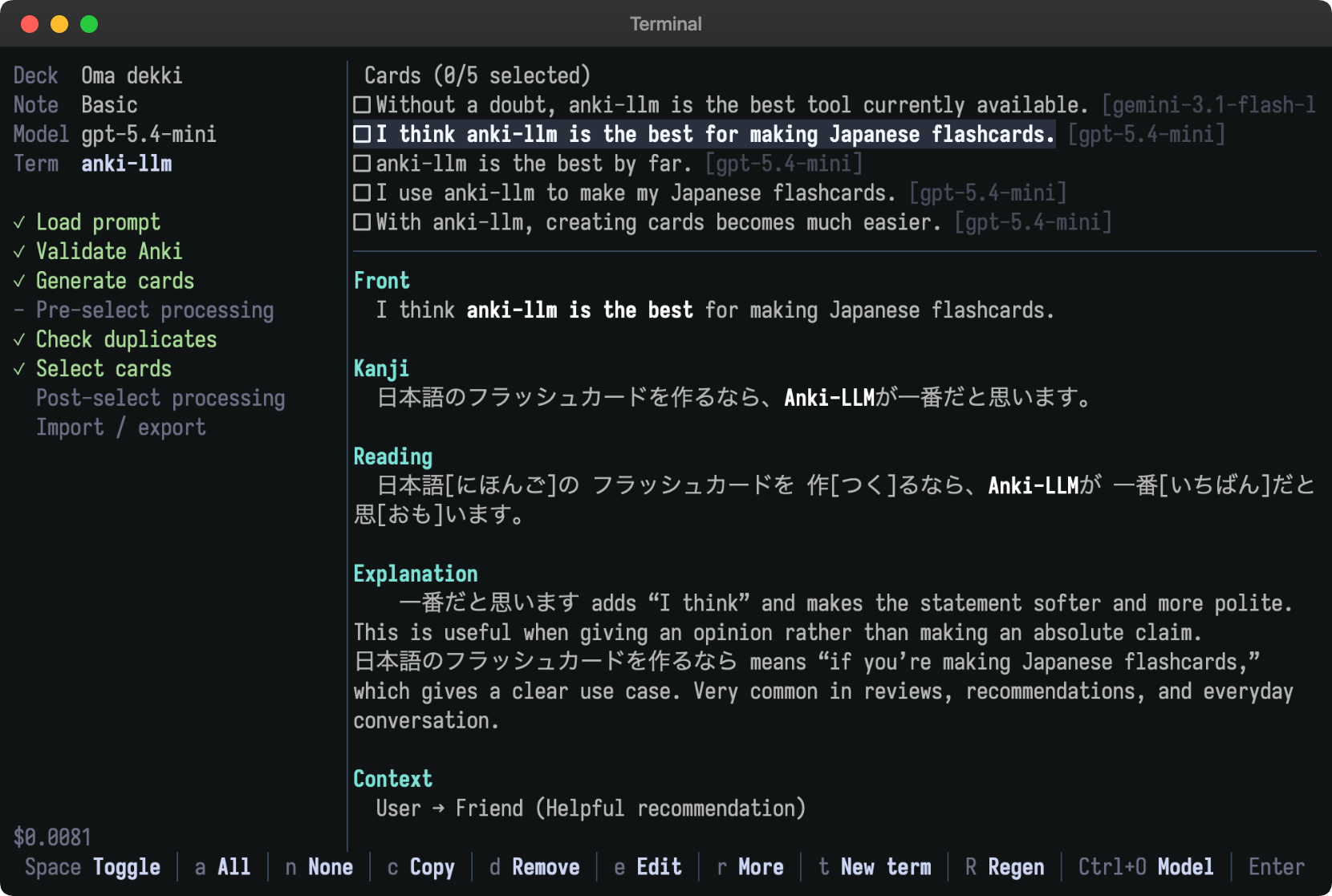 ## What people say [Section titled “What people say”](#what-people-say) > What’s next get AI to answer your flashcards for you? > > grei\_earl (Reddit) > I love this. The README is extremely detailed and clear, and using AnkiConnect to edit decks in-place avoids the usual apkg headaches. > > rahimnathwani (Hacker News) > This is cool! > > Hsaeedx (Reddit) ## Why anki-llm? [Section titled “Why anki-llm?”](#why-anki-llm) * Improve existing notes by verifying translations, adding grammar explanations, creating hints, or filling structured fields across a deck. * Generate several contextual cards for a term, inspect and edit them in the terminal UI, and import only the cards you select. * Add speech with OpenAI, Azure, Google Cloud, Amazon Polly, or Microsoft Edge text-to-speech. * Pull note type HTML and CSS into ordinary files, edit them with normal tools, and safely push them back to Anki. * Use OpenAI, Gemini, DeepSeek, xAI, OpenRouter, Ollama, or another OpenAI-compatible endpoint, with model selection, token accounting, and estimated costs for known models. * Give coding agents structured access to collection data through the JSON-oriented `anki-llm query` command. ## Choose a workflow [Section titled “Choose a workflow”](#choose-a-workflow) * [Process a file](/process-file/) to export, transform, diff, and import a reviewable CSV or YAML file. File processing supports incremental output and resume for interrupted jobs. * [Process a deck](/process-deck/) to update matching notes directly with a small preview, automatic snapshots, history, and conflict-aware rollback. * [Generate cards](/generate/) to review, edit, regenerate, and deduplicate candidate cards in an interactive terminal UI before import. * [Use text-to-speech](/tts/) to fill audio fields while preserving existing audio by default. * [Manage note types](/note-types/) to keep card template HTML and CSS in files that work with diffs, version control, editors, and coding agents. * [Work with agents](/agents/) to describe an outcome while an agent inspects the collection, prepares files, and begins with a safe sample. ## Design principles [Section titled “Design principles”](#design-principles) An Anki collection is valuable, stateful data, while language model output is probabilistic. Prompt files make transformations repeatable and explicit output fields keep updates constrained. Preview, dry-run, and limit controls expose mistakes before a whole deck is changed. Exported files provide a diffable review boundary, while direct processing creates rollback snapshots. Batch workflows support concurrency, retries, incremental progress, and file-mode resume. They can run against local or hosted OpenAI-compatible endpoints. Manual copy mode also supports browser-based language models when an API workflow is not appropriate. Generation keeps acceptance decisions with the user. The terminal UI supports duplicate detection, editing, regeneration, model switching, and optional text-to-speech before selected cards enter Anki.
# Getting started
> Install anki-llm, connect it to Anki, and run a safe first workflow.
This guide installs `anki-llm`, connects it to an OpenAI model, creates a workspace, and generates one candidate card without changing your collection. ## 1. Install `anki-llm` [Section titled “1. Install anki-llm”](#1-install-anki-llm) Choose one installation path. ### Install script [Section titled “Install script”](#install-script)
```sh
curl -fsSL https://raw.githubusercontent.com/raine/anki-llm/main/scripts/install.sh | bash
```
### Homebrew on macOS or Linux [Section titled “Homebrew on macOS or Linux”](#homebrew-on-macos-or-linux)
```sh
brew install raine/anki-llm/anki-llm
```
### Cargo [Section titled “Cargo”](#cargo)
```sh
cargo install anki-llm
```
Confirm that the command is available:
```sh
anki-llm --version
```
## 2. Connect Anki Desktop [Section titled “2. Connect Anki Desktop”](#2-connect-anki-desktop) Install the [AnkiConnect add-on](https://ankiweb.net/shared/info/2055492159) in Anki Desktop, then restart Anki. Keep Anki running while a command reads or modifies your collection. `anki-llm` uses AnkiConnect’s local HTTP API to discover decks and note types, export and update notes, add generated cards, upload media, and manage card templates. `process-file` can run with Anki closed once you have exported the input file. Test the connection:
```sh
anki-llm query version
```
A JSON version number means the connection works. See [AnkiConnect](/ankiconnect/) for connection settings and troubleshooting. Caution Commands that access your collection use the Anki profile that is open in Anki Desktop. Confirm the active profile before a bulk operation. ## 3. Configure one LLM provider [Section titled “3. Configure one LLM provider”](#3-configure-one-llm-provider) Create an [OpenAI API key](https://platform.openai.com/api-keys), then expose it to `anki-llm` in your shell:
```sh
export OPENAI_API_KEY="your-api-key-here"
```
OpenAI models are detected from their names, so this provider needs no base URL. Store a default model if you do not want to pass `--model` on each command:
```sh
anki-llm config set model gpt-5-mini
```
Run the environment diagnostic:
```sh
anki-llm doctor
```
`doctor` reports the detected key, resolved model, active workspace, and AnkiConnect status. Provider keys are secrets. Keep them in environment variables or a secret manager rather than prompt files or version control. For Gemini, OpenRouter, Ollama, and other compatible endpoints, see [Models](/models/) and [Configuration](/configuration/). ## 4. Create a workspace [Section titled “4. Create a workspace”](#4-create-a-workspace) A [workspace](/workspaces/) keeps prompts, note-type files, and model settings together. Create one in a directory you can put under version control:
```sh
mkdir my-anki-workspace
cd my-anki-workspace
anki-llm workspace init
```
This creates:
```text
my-anki-workspace/
├── anki-llm.yaml
└── prompts/
```
Check what `anki-llm` resolved:
```sh
anki-llm workspace info
```
## 5. Create a prompt for your deck [Section titled “5. Create a prompt for your deck”](#5-create-a-prompt-for-your-deck) Run the prompt wizard:
```sh
anki-llm generate-init
```
Choose a deck and note type. The wizard samples your existing cards, asks the LLM to infer their shape and style, and saves a generated prompt under `prompts/`. Review that file before using it. Its frontmatter identifies the Anki deck, note type, and field mapping, while its body controls generated content. ## 6. Run one safe candidate [Section titled “6. Run one safe candidate”](#6-run-one-safe-candidate) Generate one card without importing it:
```sh
anki-llm generate "a term from your subject" --count 1 --dry-run
```
This command calls the model and prints the generated card, but `--dry-run` prevents the normal selection and import flow. Inspect the content, field mapping, and formatting. Edit the prompt and repeat until the result fits your deck. When the output is ready, remove `--dry-run` to open the selection interface:
```sh
anki-llm generate "a term from your subject" --count 3
```
Review each candidate and import only the cards you select. ## Next steps [Section titled “Next steps”](#next-steps) * Learn the safety model and shared vocabulary in [Concepts](/concepts/). * Ask a coding agent to coordinate the workflow in [Work with agents](/agents/). * Transform exported notes with [Process a file](/process-file/). * Update notes in place with [Process a deck](/process-deck/). * Refine generation behavior in [Write prompts](/prompts/) and [Prompt reference](/prompt-reference/). * Keep project-specific defaults in [Use workspaces](/workspaces/).
# Concepts
> Understand Anki data, processing modes, prompt files, safety controls, rollback, and cost.
These concepts apply across the guides. Read this page once, then use each task-specific guide for commands and options. ## Notes, fields, note types, and cards [Section titled “Notes, fields, note types, and cards”](#notes-fields-note-types-and-cards) Anki stores **notes**, not just cards. * A **note** is one record of information, such as a word, its meaning, and an example sentence. * A **field** is one named value on that note, such as `Expression`, `Meaning`, `Translation`, or `Audio`. * A **note type**, also called a model in AnkiConnect, defines the fields a note has and the templates used to render cards. * A **card** is a review item generated from a note by one of its note type’s card templates. One note can produce multiple cards. * A **deck** contains cards. A search can select notes through their cards, so one note may appear in more than one matching context. Most `anki-llm` transformations operate on notes and fields. A processing prompt reads fields through placeholders such as `{Japanese}` and declares the field or fields it writes. Generation prompts map model output keys to fields on a target note type. The field names must match the collection. Use `anki-llm query modelNames`, then query fields with a real note type name, for example `anki-llm query modelFieldNames '{"modelName":"Basic"}'`. An agent can inspect the names before writing a prompt. See [Work with agents](/agents/) for more query examples. ## File-based and direct processing [Section titled “File-based and direct processing”](#file-based-and-direct-processing) Both processing modes apply one prompt to many notes, but they place the review boundary in different locations. ### File-based processing [Section titled “File-based processing”](#file-based-processing) The file workflow is: 1. Export notes from Anki to CSV or YAML. 2. Run `process-file` to produce a separate output file. 3. Review the output or inspect it with `git diff`. 4. Import the accepted file into Anki. Use [Process a file](/process-file/) when you want a durable staging artifact, need automatic resume for a large job, or want to process while Anki is closed. Completed output rows are saved incrementally. Re-running the same command skips complete rows unless you use `--force`. ### Direct processing [Section titled “Direct processing”](#direct-processing) `process-deck` selects notes from a deck or Anki search and updates them through AnkiConnect. It has fewer steps and automatically snapshots each run. Use [Process a deck](/process-deck/) for focused updates where a preview and rollback provide enough review. Direct processing does not resume an interrupted run. Failed notes are written to an error log in the working directory. Existing field content Direct processing normally selects a note only when every declared output field is empty. A partially populated output set is skipped. `--force` regenerates and atomically overwrites the complete declared set, so preview the exact selection before using it. ## Prompt files are durable configuration [Section titled “Prompt files are durable configuration”](#prompt-files-are-durable-configuration) A prompt file is executable project configuration for an LLM task. It has two parts: 1. YAML frontmatter declares machine-readable settings and output fields. 2. The body supplies instructions and `{FieldName}` placeholders. For example:
```markdown
---
output:
field: Translation
require_result_tag: true
---
Translate {Japanese} into natural English.
Return only the translation inside tags.
```
Keeping prompts as files makes them reviewable, repeatable, and versionable. A small wording change can alter every generated value, so treat a prompt change like a code change: inspect the diff, test a sample, and record the version used for an important run. Processing and generation use different frontmatter shapes. See [Write prompts](/prompts/) for authoring guidance and [Prompt reference](/prompt-reference/) for every supported key. ## Workspaces collect project files [Section titled “Workspaces collect project files”](#workspaces-collect-project-files) A **workspace** is a directory recognized by an `anki-llm.yaml` file or a `prompts/` directory. It gives commands a shared place to find: * prompt files under `prompts/` * note type HTML, CSS, and manifests under `note-types/` * a default model and reasoning effort in `anki-llm.yaml` The workspace in the current directory takes precedence. A configured `default_workspace` supplies the fallback when you run commands elsewhere. See [Use workspaces](/workspaces/) for setup and discovery rules. ## Preview, dry-run, and limit [Section titled “Preview, dry-run, and limit”](#preview-dry-run-and-limit) These controls answer different safety questions. ### `--dry-run` [Section titled “--dry-run”](#--dry-run) A dry run validates and displays an operation without applying its normal side effects. For `process-file` and `process-deck`, it does not call the LLM. For `generate`, it calls the LLM and displays generated cards but does not enter the selection or import flow. Command-specific guides document the exact behavior. Use it first to catch selection, placeholder, field, and configuration mistakes. ### `--preview` [Section titled “--preview”](#--preview) Preview mode for `process-file` and `process-deck` sends a small sample to the LLM, shows a diff-like summary, and asks for confirmation before the full run. The default sample is three notes and `--preview-count` changes it. Use it after a dry run to evaluate actual model output. ### `--limit` [Section titled “--limit”](#--limit) `--limit N` caps the number of new rows or notes processed. It controls scope, not whether model calls or writes occur. Combine it with dry-run or preview while tuning a prompt, and use a small limit for the first applied run. A safe progression is: 1. dry-run a small selection 2. preview a few real model responses 3. apply a small limited run 4. inspect the results in Anki or the output file 5. scale to the full selection ## Snapshots and rollback [Section titled “Snapshots and rollback”](#snapshots-and-rollback) Every `process-deck` run records the original note state under `~/.local/state/anki-llm/snapshots/`. The command prints a run ID when it finishes. List available runs:
```sh
anki-llm history
```
Preview a rollback:
```sh
anki-llm rollback --dry-run
```
Apply it after reviewing the preview:
```sh
anki-llm rollback
```
Rollback checks whether fields changed after the run and skips conflicting notes. `--force` overrides conflict detection and can overwrite later manual edits. Note-type pushes use their own snapshots under `~/.local/state/anki-llm/note-type-snapshots/` and also support a dry-run. An exported file is the recovery and review boundary for `process-file`; keep the original export until the import is verified. A snapshot reduces recovery time, but it does not validate model output. Review small samples before scaling and keep normal Anki backups. ## Cost awareness [Section titled “Cost awareness”](#cost-awareness) Each processed note usually produces one LLM request. Longer source fields, longer instructions, multiple requested output fields, retries, and extra processing steps all increase token use. Model prices can differ by orders of magnitude. `anki-llm` tracks tokens and prints estimated cost for known models. Unknown models still work, but no estimate is shown. Provider prices can change, so use the displayed estimate as guidance rather than an invoice. To control cost: * test prompt structure with `--dry-run`, which makes no model request for batch processing * use `--preview` or `--limit` on a representative sample * inspect the sample’s token and cost totals, then extrapolate * choose a smaller model for mechanical transformations * reserve capable reasoning models for prompts that benefit from them * remember that generation processing steps add model calls for each candidate that reaches the step * avoid `--force` unless intentional, because it can repeat completed work Cost control and quality control use the same discipline: start with a small, representative sample and inspect it before scaling.
# Work with agents
> Let a coding agent inspect Anki, prepare repeatable workflows, and begin with safe previews.
A coding agent can coordinate `anki-llm` from a natural-language goal. Instead of translating that goal into every CLI flag yourself, ask the agent to inspect the collection, write a prompt, run a small preview, and show you the result before scaling. For example: > Use `anki-llm` to add concise grammar breakdowns to my Japanese cards. Inspect the collection first, choose an existing empty field, and start with five cards. Show me the proposed prompt and preview before changing any notes. The CLI remains the execution and safety layer. The agent uses its JSON output, files, diffs, dry runs, previews, snapshots, and rollback commands. ## Give the agent a safe workflow [Section titled “Give the agent a safe workflow”](#give-the-agent-a-safe-workflow) A useful request states: 1. the desired outcome 2. the deck or search scope 3. fields that must be preserved 4. the size of the first sample 5. the review point that requires your approval Ask the agent to follow this sequence: 1. Run `anki-llm doctor` and inspect the active workspace. 2. Query deck, note type, and field names instead of guessing them. 3. Write the prompt and any query parameters to files in the workspace. 4. Run a dry run on a small selection. 5. Run an LLM-backed preview and present the diff. 6. Stop before the first applied mutation unless you already authorized it. 7. Scale only after the sample is accepted. 8. Report the direct-run snapshot ID or preserve the file-based inputs and outputs. Caution An agent can issue commands quickly, including `--force`. State the approval boundary explicitly and require small previews for collection changes. Keep Anki backups even when snapshots are available. See [Concepts](/concepts/#preview-dry-run-and-limit) for the exact distinction between dry-run, preview, and limit. ## Inspect Anki with `anki-llm query` [Section titled “Inspect Anki with anki-llm query”](#inspect-anki-with-anki-llm-query) `anki-llm query [params]` calls any supported AnkiConnect action and prints clean JSON. This gives an agent a scriptable way to discover your actual collection before it prepares a transformation.
```sh
# List decks
anki-llm query deckNames
# List note types
anki-llm query modelNames
# Find notes without loading every note body
anki-llm query findNotes '{"query":"deck:Japanese tag:leech"}'
# Read selected notes
anki-llm query notesInfo '{"notes":[1498938915662]}'
# Read deck statistics
anki-llm query getDeckStats '{"decks":["Japanese"]}'
```
Parameters are a JSON object passed as one shell argument. Let the agent build that JSON rather than manually escaping a long request. ### Give the agent the action reference [Section titled “Give the agent the action reference”](#give-the-agent-the-action-reference) Run this once when an agent needs to choose among AnkiConnect actions:
```sh
anki-llm query docs
```
`docs` and `help` return the complete bundled AnkiConnect action documentation. The same reference is available as [`ANKI_CONNECT.md`](https://github.com/raine/anki-llm/blob/main/ANKI_CONNECT.md). ## Keep reusable queries as documents [Section titled “Keep reusable queries as documents”](#keep-reusable-queries-as-documents) A one-line query can stay in shell history. For analysis, migrations, or multi-step work, ask the agent to create a short query document in your workspace. Record: * the natural-language goal * the exact Anki search string * action names and JSON parameters * output filenames * assumptions about decks, note types, and fields * the preview and approval boundary This creates a reviewable specification for what the agent selected. It also makes a future rerun safer than reconstructing intent from terminal history. Query outputs can contain private study material, so decide whether they belong in version control. A multi-step extraction can combine discovery, random sampling, field reads, and file output. This [example agent conversation](https://gist.github.com/raine/b8d42275a188005bd2dadc34b8e05824) asks an agent to sample ten cards from each matching Glossika deck and save their English and Japanese fields to Markdown. It illustrates why clean JSON output and the action reference are useful together. ## Edit note types through files [Section titled “Edit note types through files”](#edit-note-types-through-files) Agents are especially effective at card template work because `anki-llm` can represent a note type as ordinary HTML, CSS, and YAML files.
```sh
anki-llm note-type pull "Japanese Vocabulary"
anki-llm note-type status
```
Ask the agent to edit files under `note-types//`, then inspect the diff. Preview the push without changing Anki:
```sh
anki-llm note-type push "Japanese Vocabulary" --dry-run
```
After approval, apply it:
```sh
anki-llm note-type push "Japanese Vocabulary"
```
A push snapshots the current Anki templates and refuses to overwrite remote changes that diverged from the last sync unless `--force` is supplied. Adding, removing, renaming, or reordering card templates remains an Anki GUI task. See [Manage note types](/note-types/) for layout and safety details. ## Give agents LLM-readable documentation [Section titled “Give agents LLM-readable documentation”](#give-agents-llm-readable-documentation) The documentation site publishes text endpoints intended for language models: * [`/llms.txt`](/llms.txt) is the entry point and links the available sets. * [`/llms-small.txt`](/llms-small.txt) contains an abridged documentation set. * [`/llms-full.txt`](/llms-full.txt) contains the complete documentation set. Give an agent `https://anki-llm.raine.dev/llms.txt` when it needs product concepts, workflows, prompt formats, and command behavior. The generated text comes from the same source as this site. ## Product docs and action docs serve different jobs [Section titled “Product docs and action docs serve different jobs”](#product-docs-and-action-docs-serve-different-jobs) Use the **product documentation** on this site to understand `anki-llm`: workflows, CLI commands, prompt formats, workspaces, safety behavior, and model configuration. Use the **AnkiConnect action documentation** from `anki-llm query docs` or [`ANKI_CONNECT.md`](https://github.com/raine/anki-llm/blob/main/ANKI_CONNECT.md) to choose low-level actions and construct their JSON parameters. An agent usually needs both. Product docs answer “How should this operation be performed safely with `anki-llm`?” Action docs answer “Which AnkiConnect action and parameter shape exposes this collection operation?” ## Prompt examples for your agent [Section titled “Prompt examples for your agent”](#prompt-examples-for-your-agent) ### Enrich existing notes [Section titled “Enrich existing notes”](#enrich-existing-notes) > Inspect my `Japanese` deck and its note types with `anki-llm query`. Propose a prompt that fills an existing empty `Grammar` field without changing any other fields. Dry-run five notes, then use `--preview` for three model responses. Show me the prompt and preview. Do not apply the full run. ### Build a reviewable file pipeline [Section titled “Build a reviewable file pipeline”](#build-a-reviewable-file-pipeline) > Export notes matching `deck:Spanish tag:needs-review` to YAML. Create a prompt that verifies the `English` translation from the `Spanish` field. Process ten rows first and preserve the original export. Show me a diff of the output and estimate full-run cost. Do not import anything yet. ### Analyze a collection [Section titled “Analyze a collection”](#analyze-a-collection) > Use `anki-llm query docs` to find the right actions, then report note counts by deck and note type. Save the query goal, exact actions, and parameters to a workspace document. Do not modify Anki. ### Redesign a card template [Section titled “Redesign a card template”](#redesign-a-card-template) > Pull the `Japanese Vocabulary` note type with `anki-llm note-type`. Improve the back template’s reading hierarchy and mobile layout while preserving every field reference. Show the file diff and a dry-run push. Do not push until I approve it. ### Generate cards [Section titled “Generate cards”](#generate-cards) > Inspect my vocabulary deck, run `generate-init` in the active workspace, and review the generated prompt for the correct field mapping. Generate one card for `会議` with `--dry-run`. Show me the card and estimated cost before opening the import flow. For complete prompt files you can adapt, point the agent at the [`examples/` directory](https://github.com/raine/anki-llm/tree/main/examples).
# Process a file
> Export notes, process them with an LLM, and review the results before importing them.
Use the file workflow when you want a reviewable artifact between Anki and the LLM. It is a good fit for large jobs because progress is saved incrementally and the same command resumes an interrupted run. The workflow has three stages: 1. Export notes from Anki to CSV or YAML. 2. Process the exported rows into a separate output file. 3. Review the output and import it into Anki. ## 1. Export the notes [Section titled “1. Export the notes”](#1-export-the-notes) Anki must be open with AnkiConnect installed while exporting:
```sh
anki-llm export "Japanese Core 1k" --output notes.yaml
```
When you select a deck and omit `--output`, anki-llm derives a YAML filename from the deck name, such as `Japanese Core 1k` to `japanese-core-1k.yaml`. A `--query` export requires an explicit output path:
```sh
anki-llm export --query 'deck:Japanese -field:Audio' --output missing-audio.yaml
```
You can export a deck or select notes with an Anki search query. Each exported row includes a note ID, which `process-file` uses to match input rows with saved output and `import` uses to update the original note. See [`export` in the command reference](/command-reference/#command-export) for deck, query, note type, and output options. ## 2. Write a processing prompt [Section titled “2. Write a processing prompt”](#2-write-a-processing-prompt) A batch prompt declares its destination field in YAML frontmatter and refers to source fields with placeholders:
```markdown
---
output:
field: Translation
require_result_tag: true
---
Translate this Japanese sentence into natural English: {Japanese}
Return the final translation inside tags.
```
See [Write batch prompts](/prompts/) for single-field and multi-field prompts, validation rules, result tags, and staging fields. ## 3. Preview the operation [Section titled “3. Preview the operation”](#3-preview-the-operation) Start with a dry run. It prints the prompt template, a sample row, and the filled sample prompt without calling the model or writing output:
```sh
anki-llm process-file notes.yaml \
--output notes-processed.yaml \
--prompt prompt.md \
--dry-run
```
Then process a small sample with the model:
```sh
anki-llm process-file notes.yaml \
--output notes-processed.yaml \
--prompt prompt.md \
--preview \
--preview-count 3
```
Preview mode shows a field-by-field summary and asks whether to continue. If you cancel, it makes no changes. Use `--limit 20` when you want to produce a small output file, inspect it in full, and estimate quality and cost before scaling up. Caution A dry run validates template expansion but cannot judge model output. Use a model-backed preview or a limited run before processing a large collection. ## 4. Process the file [Section titled “4. Process the file”](#4-process-the-file) Run the full job after the sample looks right:
```sh
anki-llm process-file notes.yaml \
--output notes-processed.yaml \
--prompt prompt.md \
--model gemini-2.5-flash \
--batch-size 10
```
Each row becomes one model request. Requests run concurrently according to the batch size, and transient failures use the configured retry count. The terminal UI shows progress, token use, and estimated cost. When output is piped, the command uses plain progress output instead. For the complete option list, including runtime, model, retry, and diagnostic settings, see [`process-file` in the command reference](/command-reference/#command-process-file). ### Resume an interrupted run [Section titled “Resume an interrupted run”](#resume-an-interrupted-run) `process-file` writes successful rows to the output file incrementally. Rerun the same command with the same output path to resume:
```sh
anki-llm process-file notes.yaml \
--output notes-processed.yaml \
--prompt prompt.md
```
Rows are matched by `noteId`, `id`, or `Id`. Input IDs must be present and unique. A corrupt output file or duplicate output ID stops the run rather than silently discarding saved progress. Completion depends on the prompt shape: * For `output.field`, a row is complete when the output contains that field. * For `output.fields`, a row is complete only when every declared field has a populated value. * Rows carrying a processing error, and partially populated multi-field rows, remain eligible for retry. Use `--force` only when you intend to ignore saved output and process every input row again. ### Understand multi-field writes [Section titled “Understand multi-field writes”](#understand-multi-field-writes) A multi-field prompt makes one request per row and expects one structured JSON object containing every declared field. Validation happens before the row is saved. If a response is missing a field, contains an empty value, uses a non-string value, or includes an undeclared field, the whole row fails and none of its declared fields are applied. This all-or-nothing behavior prevents related fields such as `Reading`, `Explanation`, and `KanjiBreakdown` from getting out of sync. Source and undeclared fields are preserved in the output. ### Capture raw model traffic [Section titled “Capture raw model traffic”](#capture-raw-model-traffic) When a prompt behaves unexpectedly, append raw prompts, responses, and errors to a log file:
```sh
anki-llm process-file notes.yaml \
--output notes-processed.yaml \
--prompt prompt.md \
--log process.log
```
The command reference documents the additional terminal logging mode. Logs can contain complete card fields and model output, so store and share them with the same care as your collection. ## 5. Review and import [Section titled “5. Review and import”](#5-review-and-import) Inspect the output before updating Anki. For YAML tracked in Git, a direct diff is useful:
```sh
git diff --no-index notes.yaml notes-processed.yaml
```
When the changes look right, open Anki and import them:
```sh
anki-llm import notes-processed.yaml --deck "Japanese Core 1k"
```
The importer identifies existing notes with `--key-field` when supplied. Without it, the importer uses `noteId` when that column exists, then falls back to the note type’s first field. Matching rows update existing notes, while unmatched rows create notes in the destination deck. Blank, duplicate, or ambiguous keys stop the import instead of choosing a note nondeterministically. Destination note fields that are absent from the file are preserved, and file fields that do not exist on the destination note type are ignored. See [`import` in the command reference](/command-reference/#command-import) for its complete options. ## When Anki can be closed [Section titled “When Anki can be closed”](#when-anki-can-be-closed) Anki and AnkiConnect are required for `export` and `import`. The middle `process-file` stage reads and writes local files only, so Anki can remain closed for the entire LLM run. This makes file mode suitable for long or remote processing sessions.
# Process a deck
> Run an LLM over selected notes and update them directly in Anki.
`process-deck` sends selected notes to an LLM and writes validated results back to Anki without an intermediate data file. Use it for focused jobs where direct updates and automatic rollback snapshots are more convenient than an export-review-import cycle. Caution Anki Desktop must stay open with AnkiConnect installed for the entire run. `process-deck` updates the collection as successful batches finish and does not support resume. Use [the file workflow](/process-file/) for a long run where an interruption is likely. ## Prepare the prompt [Section titled “Prepare the prompt”](#prepare-the-prompt) Batch prompts declare one or more Anki fields to write. This example fills an empty `Hint` field:
```markdown
---
output:
field: Hint
---
Write a short hint for this card without giving away the answer.
Question: {Front}
Answer: {Back}
```
See [Write batch prompts](/prompts/) for placeholders, structured multi-field output, validation, and result tags. ## Select notes [Section titled “Select notes”](#select-notes) Pass either a deck name or an Anki search query:
```sh
anki-llm process-deck "Japanese Core 1k" --prompt hint.md
```
```sh
anki-llm process-deck \
--query 'deck:Japanese prop:lapses>5' \
--prompt explanation.md
```
Queries let you target useful subsets, for example `tag:leech` or `rated:7:1`. If the selection contains more than one note type, filter it with the note-type option so every selected note has the same fields. See [`process-deck` in the command reference](/command-reference/#command-process-deck) for the exact selection syntax and complete option list. ## Preview safely [Section titled “Preview safely”](#preview-safely) First inspect template expansion without making an API request or changing Anki:
```sh
anki-llm process-deck "Japanese Core 1k" \
--prompt hint.md \
--limit 10 \
--dry-run
```
Then ask the model to process a small sample and review the proposed changes:
```sh
anki-llm process-deck "Japanese Core 1k" \
--prompt hint.md \
--preview \
--preview-count 3
```
Preview mode displays each changed field and asks for confirmation before the full run. Cancelling the preview leaves Anki unchanged. A small `--limit` run is also useful for checking real cards, cost, and formatting before broadening the selection. ## Protect existing fields [Section titled “Protect existing fields”](#protect-existing-fields) By default, a note is processed only when every declared output field is empty. If any target already contains content, the note is skipped. This rule is especially important for multi-field prompts. Suppose a prompt declares:
```yaml
output:
fields:
- Reading
- Explanation
- KanjiBreakdown
```
A note with content in any one of those fields is skipped. Passing `--force` regenerates and atomically overwrites the complete declared set:
```sh
anki-llm process-deck "Japanese Core 1k" \
--prompt enrich.md \
--preview \
--force
```
The model response must validate for every field before any field on that note is updated. A failed or invalid response leaves the complete target set unchanged. Danger `--force` authorizes replacement of existing target content. Always combine it with a narrow query, a limit, or `--preview` until you have verified the prompt. ## Run the update [Section titled “Run the update”](#run-the-update) After the preview looks right, run the selected scope:
```sh
anki-llm process-deck \
--query 'deck:Japanese tag:needs-hint' \
--prompt hint.md \
--model gemini-2.5-flash
```
Successful batches are written directly to Anki. The UI reports progress, token use, estimated cost, and the final snapshot run ID. ### Inspect failures [Section titled “Inspect failures”](#inspect-failures) Failed notes are written as JSON Lines in the working directory. The filename is based on the deck or query slug, such as:
```text
japanese-core-1k-errors.jsonl
```
Each record includes the note data and error, which makes it possible to diagnose placeholder, API, and response-validation failures. Raw request logging is also available when you need to inspect complete model prompts and responses. See the [command reference](/command-reference/#command-process-deck) for logging options. Error logs and raw LLM logs may contain private card content. Keep them out of public repositories. ## Review history and roll back [Section titled “Review history and roll back”](#review-history-and-roll-back) Every run that updates at least one note saves the original field values in a snapshot under:
```text
~/.local/state/anki-llm/snapshots/
```
List available runs:
```sh
anki-llm history
```
The table shows each run ID, source, model, note count, and rollback status. Use the run ID to preview a restore:
```sh
anki-llm rollback 20260411T153000_123Z --dry-run
```
Apply the rollback after reviewing it:
```sh
anki-llm rollback 20260411T153000_123Z
```
Rollback checks whether fields changed after the processing run. If a note was edited later in Anki, that note is reported as a conflict and skipped, which protects the newer edit. A forced rollback overrides conflict detection and restores the snapshot values, so reserve it for cases where the snapshot is the intended source of truth. See [`history`](/command-reference/#command-history) and [`rollback`](/command-reference/#command-rollback) for their complete command options.
# Command reference
> Review every anki-llm command, argument, and option.
This reference is generated from the command-line interface definition. ## Command index [Section titled “Command index”](#command-index) * [`anki-llm export`](#command-export) * [`anki-llm import`](#command-import) * [`anki-llm process-file`](#command-process-file) * [`anki-llm process-deck`](#command-process-deck) * [`anki-llm query`](#command-query) * [`anki-llm config`](#command-config) * [`anki-llm config get`](#command-config-get) * [`anki-llm config set`](#command-config-set) * [`anki-llm config unset`](#command-config-unset) * [`anki-llm config list`](#command-config-list) * [`anki-llm config path`](#command-config-path) * [`anki-llm generate`](#command-generate) * [`anki-llm generate-init`](#command-generate-init) * [`anki-llm history`](#command-history) * [`anki-llm rollback`](#command-rollback) * [`anki-llm tts`](#command-tts) * [`anki-llm tts-voices`](#command-tts-voices) * [`anki-llm update`](#command-update) * [`anki-llm docs`](#command-docs) * [`anki-llm workspace`](#command-workspace) * [`anki-llm workspace init`](#command-workspace-init) * [`anki-llm workspace info`](#command-workspace-info) * [`anki-llm note-type`](#command-note-type) * [`anki-llm note-type pull`](#command-note-type-pull) * [`anki-llm note-type push`](#command-note-type-push) * [`anki-llm note-type status`](#command-note-type-status) * [`anki-llm doctor`](#command-doctor) []() ## `anki-llm` [Section titled “anki-llm”](#anki-llm) Bulk-process Anki flashcards with LLMs **Usage**
```text
Usage: anki-llm
```
**Options** * **`-h, --help`**: Print help * **`-V, --version`**: Print version []() ## `anki-llm export` [Section titled “anki-llm export”](#anki-llm-export) Export an Anki deck to CSV or YAML **Usage**
```text
Usage: anki-llm export [OPTIONS] >
```
**Arguments** * **`[DECK]`**: Deck name to export **Options** * **`-q, --query `**: Anki search query (e.g. “tag:leech”, “prop:lapses>3”, “deck:Japanese -field:Audio”) * **`-o, --output